Configuring Typesense
Introduction
I’m a big advocate for notetaking, particularly in research and school. The best solution that I’ve found is running Mediawiki in a Docker Container (See
Gitea almost fills this gap, but the lack of a decent search is a show stopper. The pre-configured Bleve is good but it’s configured for code and needs to be adapted to long form text. Although I’ve used Bleve before (See my notetaking cli) and I was working on migrating that Tantivy, I absolutely did not want to write up the logic for and indexer or put together a JS interface. Even if I did, the lack any semantic search is a real loss when your journal serves as an index, an idea I adapted from Logseq 2.
Today was the day I decided to solve this problem. Although I haven’t integrated it into Gitea yet, Being able to index documentation and embed them in my notes is awesome. I intend to combine this by using an <iframe> to throw H2O GPT into the same page as well, that way I can have documentation at arms length while I’m writing up my notes.
Anyway, a quick google search suggested the following FOSS SaaS:
I went with TypeSense entirey because it was the first link I clicked. In hindsight MeiliSearch seemed to have better documentation. See Generally 3
Configuring Type Sense
Backend
-
Docker Compose
TypeSense has a docker-compose.yml and a corresponding .env, making it simple to test out and move between machines. I’m a big fan of Docker for stuff like this!
I left everything more-or-less default, although I’ll likely configure a lot of this later:
# image: https://hub.docker.com/r/typesense/typesense/tags # docs: https://typesense.org/docs/guide/install-typesense.html # https://typesense.org/docs/guide/docsearch.html#add-docsearch-meta-tags-optional # https://typesense.org/docs/0.23.0/api/server-configuration.html#using-command-line-arguments version: "3.8" services: typesense: image: typesense/typesense:${APP_VERSION} container_name: ${APP_NAME} restart: always ports: - "${APP_HTTP_PORT}:8108" environment: - TYPESENSE_API_KEY=${APP_KEY} - TYPESENSE_DATA_DIR=${APP_DATA_PATH} - TYPESENSE_ENABLE_CORS=true volumes: - typesense:/data docsearch-scraper: image: typesense/docsearch-scraper:latest container_name: ${APP_NAME}-scraper restart: always environment: - TYPESENSE_API_KEY=${APP_KEY} - TYPESENSE_HOST=${APP_HOST} - TYPESENSE_PORT=${APP_HTTP_PORT} - TYPESENSE_PROTOCOL=${APP_PROTOCOL} - CONFIG={ "index_name":"websoft9", "start_urls":["https://support.websoft9.com/"], "selectors":{ "lvl0":{ "selector":"(//ul[contains(@class,'menu__list')]//a[contains(@class, 'menu__link menu__link--sublist menu__link--active')]/text() | //nav[contains(@class, 'navbar')]//a[contains(@class, 'navbar__link--active')]/text())[last()]", "type":"xpath", "global":true, "default_value":"Documentation"}, "lvl1":"header h1", "lvl2":"article h2", "lvl3":"article h3", "lvl4":"article h4", "lvl5":"article h5,article td:first-child", "lvl6":"article h6", "text":"article p, article li, article td:last-child"}, "strip_chars":" .,;:#", "custom_settings":{ "separatorsToIndex":"_", "attributesForFaceting":["language","version","type","docusaurus_tag"], "attributesToRetrieve":["hierarchy","content","anchor","url","url_without_anchor","type"]}, "conversation_id":["833762294"], "nb_hits":46250} depends_on: - typesense networks: default: name: ${APP_NETWORK} external: true volumes: typesense:POWER_PASSWORD=spJNF09yzwWJaG! APP_VERSION=0.22.2 APP_HTTP_PORT=8109 APP_KEY=$POWER_PASSWORD APP_NAME=typesense APP_DATA_PATH=/data APP_ENABLE_CORS=True APP_HOST=172.17.0.1 APP_PROTOCOL=http APP_NETWORK=websoft9 -
Modifying the docker compose
I elected to get the Pytorch docs locally, these were the necessary changes:
32,33c32,33 < "index_name":"websoft9", < "start_urls":["https://support.websoft9.com/"], --- > "index_name":"pytorch", > "start_urls":["https://pytorch.org/tutorials/beginner/basics/intro.html"], 57,60c57,60 < networks: < default: < name: ${APP_NETWORK} < external: true --- > # networks: > # default: > # name: ${APP_NETWORK} > # external: true 64a65 -
Spinning it up
After running:
docker compose upAll the logs were dumped, but the important ones are:
...
...
typesense-scraper  | DEBUG:typesense.api_call:172.17.0.1:8109 is healthy. Status code: 200
typesense-scraper  | > DocSearch: https://pytorch.org/tutorials/beginner/basics/ 27 records)
typesense-scraper  | > DocSearch: https://pytorch.org/tutorials/beginner/basics/autograd_tutorial.html 44 records)
typesense-scraper  | > DocSearch: https://pytorch.org/tutorials/beginner/basics/tensorqs_tutorial.html 39 records)
typesense-scraper  | > DocSearch: https://pytorch.org/tutorials/beginner/basics/transforms_tutorial.html 17 records)
typesense-scraper  | > DocSearch: https://pytorch.org/tutorials/beginner/basics/saveloadrun_tutorial.html 23 records)
typesense-scraper  | > DocSearch: https://pytorch.org/tutorials/beginner/basics/autogradqs_tutorial.html 56 records)
typesense-scraper  | > DocSearch: https://pytorch.org/tutorials/beginner/basics/buildmodel_tutorial.html 35 records)
typesense-scraper  | > DocSearch: https://pytorch.org/tutorials/beginner/basics/data_tutorial.html 40 records)
typesense-scraper  | > DocSearch: https://pytorch.org/tutorials/beginner/basics/quickstart_tutorial.html 29 records)
typesense-scraper  | > DocSearch: https://pytorch.org/tutorials/beginner/basics/intro.html 20 records)
typesense-scraper  | > DocSearch: https://pytorch.org/tutorials/beginner/basics/optimization_tutorial.html 48 records)
typesense-scraper  | > DocSearch: https://pytorch.org/tutorials/beginner/basics/tensor_tutorial.html 47 records)
typesense-scraper  |
typesense-scraper  | Nb hits: 425
typesense-scraper  |
typesense-scraper exited with code 0
...
...

mkdir media
xclip -sel clip -o > media/screenshot-of-docker-compose.yml
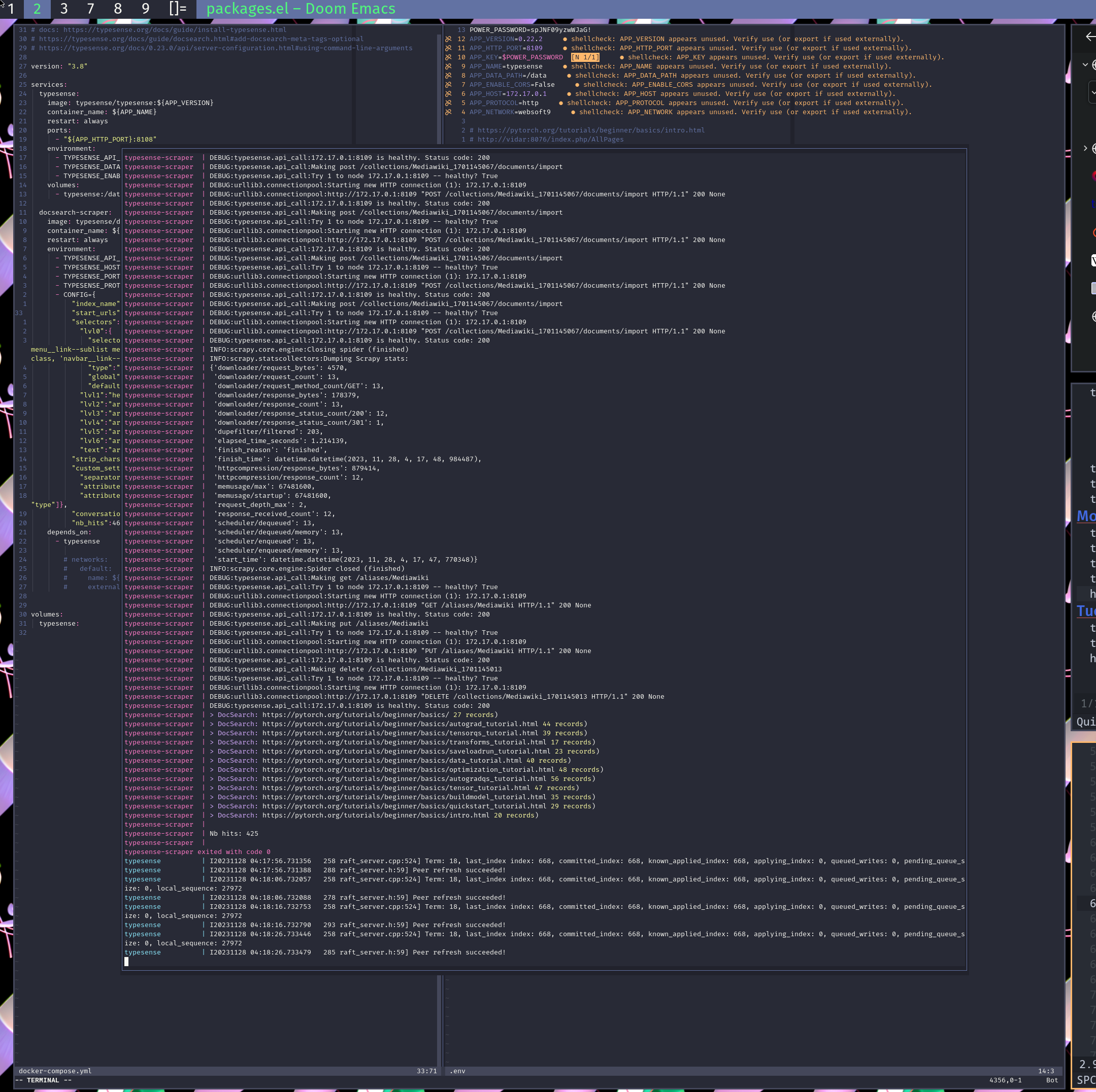
Here’s a screenshot of the process:
Front End
With the indexing done, the final step is to the end results! To this end I embedded the Javascript from the documentation into my Mediawiki. In my wiki I’ve set $wgRawHTML = true; in the LocalSettings.php because I like to throw bits of JS into my notes, however, one could also take advantage of [[:Mediawiki:Common.js]] and [[:Mediawiki:Common.css]].
It would also be possible to simply spin up a python3 -m http.server 4.
After adding this to a page:
<html>
<!-- Somwhere in your doc site's navigation -->
<div id="searchbar"></div>

<!-- Before the closing head -->
<link
  rel="stylesheet"
  href="https://cdn.jsdelivr.net/npm/typesense-docsearch-css@0.3.0"
/>

<!-- Before the closing body -->
<script src="https://cdn.jsdelivr.net/npm/typesense-docsearch.js@3.4"></script>

<script>
  docsearch({
    container: '#searchbar',
    typesenseCollectionName: 'pytorch', // Should match the collection name you mention in the docsearch scraper config.js
    typesenseServerConfig: {
      nodes: [{
        host: 'localhost', // For Typesense Cloud use xxx.a1.typesense.net
        port: '8109',      // For Typesense Cloud use 443
        protocol: 'http'   // For Typesense Cloud use https
      }],
      apiKey: 'spJNF09yzwWJaG!', // Use API Key with only Search permissions
    },
    /*
    typesenseSearchParameters: { // Optional.
      filter_by: 'version_tag:=0.21.0' // Useful when you have versioned docs
    },
    */
  });
</script>

</html>
and changing the:
portto8109apiKeytypesenseCollectionName
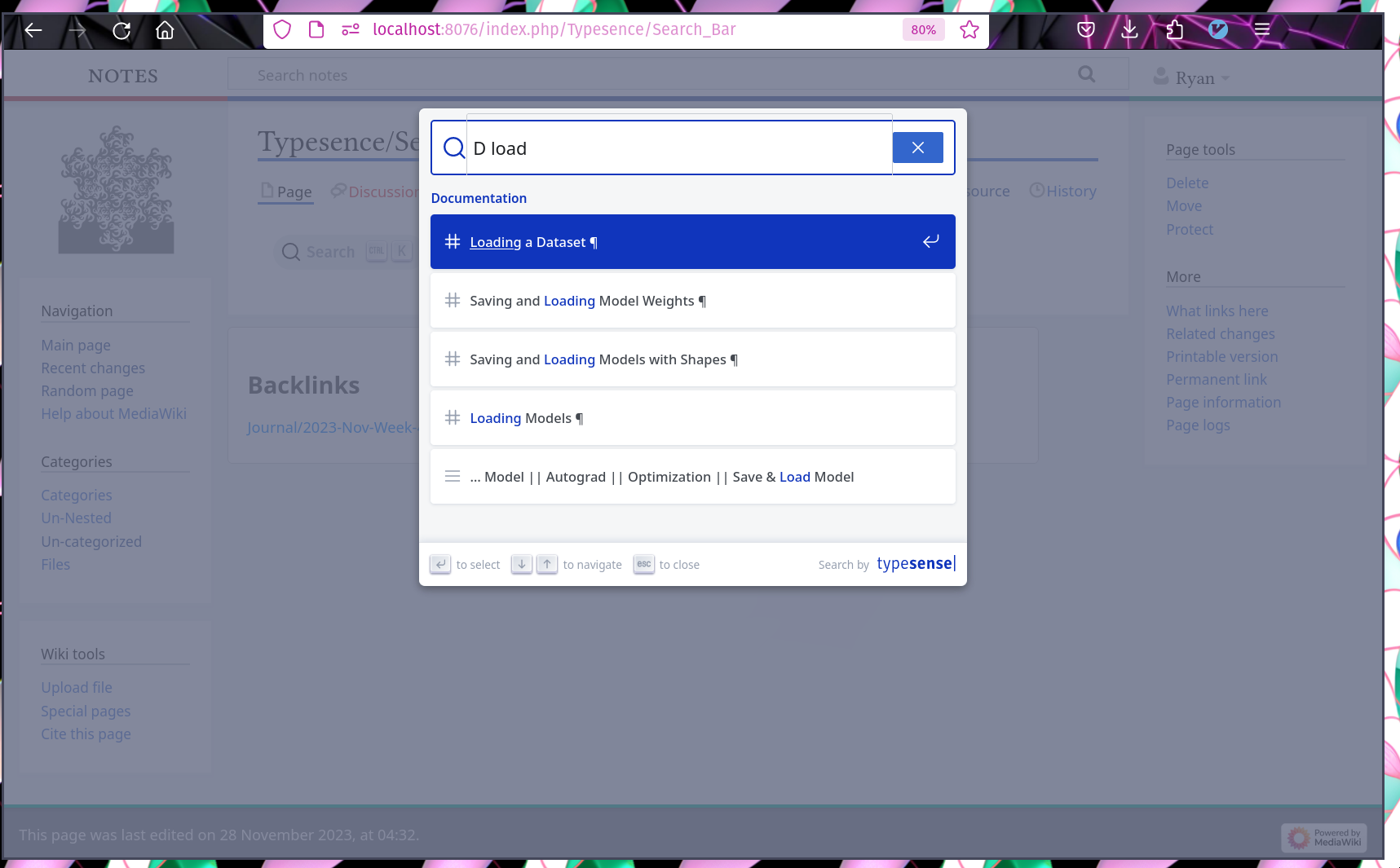
to match the .env file, the bar appeared in the page, like magic:
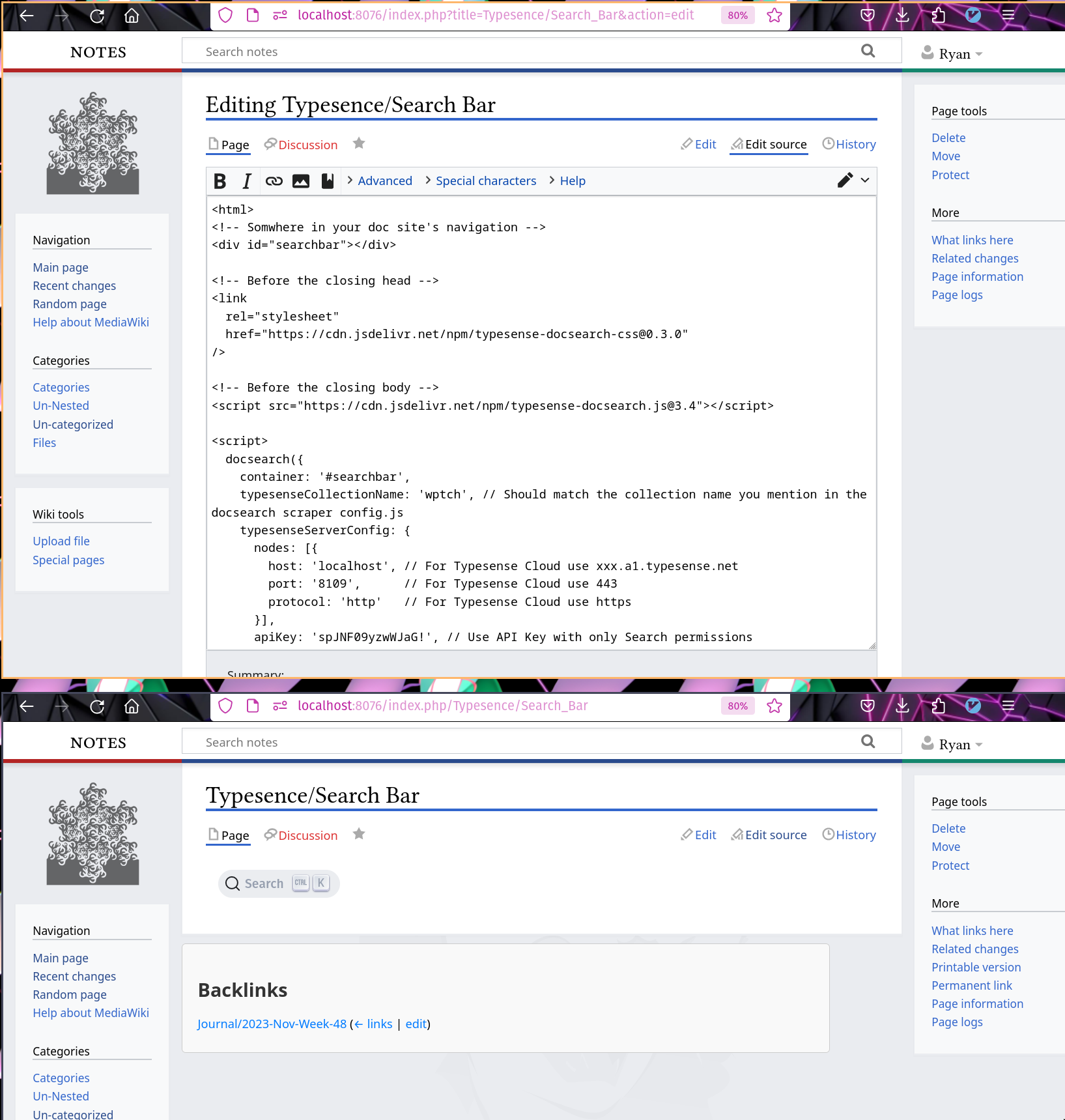
The end result is is a search bar for PyTorch embedded in my Notes.
Next Steps
-
Semantic Search
Semantic Search in a container on the GPU would be a lot better, I’ll get around to this
#TODO. -
Over my Notes
For whatever reason, it will not run over my Mediawiki, although it will run over Wikipedia. So I’ll have to debug that. If anybody else wants to try, here’s an easy way to develop a sitemap:
Footnotes
1 So no to Obsidian, VNote is good, but the lack of wikilinks is really unfortunate.
2 God this would be a fantastic program if they didn’t turn everything into list items!
3 meilisearch/meilisearch#1148 Fair comparison with Typesense
4 I am also partial to rclone serve webdav -L ./ -addr 0.0.0.0:8080 --user john --pass 123 because it follows symlinks (-L) and allows for a password.